

Getting ungated on Amazon is your key to unlocking restricted categories and brands. It's a formal approval process where you prove to Amazon that you're a legitimate seller with authentic products, usually by providing verifiable invoices and maintaining a stellar seller account.
Nail this process, and you’ll find yourself selling higher-margin products with way less competition. It's a total shift in your selling potential.
Why Getting Ungated Is A Game Changer For Sellers
So many sellers get stuck competing in wide-open categories where profit margins are razor-thin. Learning how to get ungated is your ticket out of that crowded, cutthroat race to the bottom. It’s a strategic move that elevates your business from a generalist reseller to a specialized, more profitable operation.
Once you get access to gated categories like Topicals, Fine Jewelry, or major electronics brands, you’re playing in a different league. These are products with powerful brand recognition and loyal customers who prioritize authenticity and quality—which is exactly why Amazon restricts them in the first place.
When you meet Amazon's higher standards, you're not just unlocking a category; you're signaling that you're a serious, professional seller. This builds trust, grants you access, and helps you create a more resilient business that isn’t so vulnerable to constant price wars.
The Stakes Are Getting Higher
The Amazon marketplace isn't getting any less crowded. With third-party sellers now accounting for roughly 62% of marketplace sales as of Q3 2025, Amazon has doubled down on its brand protection efforts.
This means successful ungating applications increasingly depend on flawless documentation and a squeaky-clean sales history. Amazon is tightening the gates to keep counterfeit goods out, which makes getting through them even more valuable.
With fewer sellers able to clear these hurdles, those who succeed find themselves in a more exclusive market with much better opportunities.
The real win with ungating isn’t just about selling new stuff. It’s about elevating your business to a level where you can build a defensible brand and a stable income, far from the chaos of hyper-competitive niches.
The Pillars Of A Successful Application
Whether your application is reviewed by a bot or a person, Amazon is looking for clear signals of professionalism and trustworthiness. Before you even think about applying, make sure you have these three pillars locked down.
- A Professional Seller Account: This one is non-negotiable. An Individual account ($0/month) simply won't cut it for most gated categories.
- Excellent Account Health: Your Order Defect Rate (ODR), Pre-fulfillment Cancel Rate, and Late Shipment Rate need to be well within Amazon's targets. No exceptions.
- Verifiable Documentation: You need legitimate invoices from reputable suppliers or official letters of authorization. Retail receipts are an automatic rejection.
To give you a clearer picture, here’s a quick breakdown of what Amazon requires versus what you gain by meeting those standards.
Ungating at a Glance Key Requirements vs Benefits
| Requirement | Why It's Important | Benefit of Meeting It |
|---|---|---|
| Professional Seller Account | Shows commitment and unlocks essential selling tools. | Grants eligibility to even apply for restricted categories. |
| Strong Account Health Metrics | Proves you are a reliable seller who provides a good customer experience. | Builds trust with Amazon, increasing your chances of a quick approval. |
| Authentic Invoices (not receipts) | Verifies your supply chain and the authenticity of your products. | Opens doors to higher-margin products with less competition. |
| Minimum Order Quantities | Demonstrates a serious investment in the product line. | Establishes a legitimate business relationship with your suppliers. |
Ultimately, mastering these requirements is your first real step toward unlocking profitable new categories and transforming your business.
Getting these fundamentals right is crucial, especially in high-stakes categories. If you're tackling something like supplements, you'll benefit from a complete guide to selling supplements on Amazon. And once you're in, be sure to check out our other strategies on https://npoint.digital/how-to-increase-sales-on-amazon/ to make the most of your new access.
Laying the Groundwork for Your Ungating Application

Before you even think about pulling together invoices, the first place you need to look is your own Seller Central account. Think of Amazon's automated systems as the first line of defense, and their initial judgment is based entirely on the health of your seller profile.
Getting this foundation right isn't just a suggestion—it's non-negotiable. Trying to get ungated without a healthy account is like building a house on sand. It just won't work.
First thing's first: you absolutely must have a Professional Seller Account. An Individual account doesn't cut it. It lacks the features and, more importantly, signals a lack of commitment to Amazon. Consider the $39.99 monthly fee your ticket to the game. It tells Amazon you're a serious business, not just a casual hobbyist, and without it, your application is dead on arrival.
Keep Your Account Health Spotless
Your Account Health Dashboard is everything. It's your seller report card, and believe me, Amazon checks it closely. Even a small slip-up can trigger an automatic "no" before a real person ever lays eyes on your request.
Zero in on these three core metrics:
- Order Defect Rate (ODR): This has to be under 1%. ODR is a mix of negative feedback, A-to-z claims, and chargebacks. It's the clearest sign of whether you're delivering a good customer experience.
- Pre-fulfillment Cancel Rate: Keep this below 2.5%. A high number here screams poor inventory management, which is a massive red flag for Amazon.
- Late Shipment Rate (LSR): This must stay under 4%. It's simple proof that you can ship on time, every time.
If any of these numbers are creeping toward the thresholds, hit the brakes on your ungating plans. Seriously. Dig in, find the root cause of the problem—whether it's an inventory snag or a shipping bottleneck—and fix it. A dashboard full of green checkmarks is your green light to move forward.
The Unspoken Rule: Sales History Matters
While it’s not always written in the official guidelines, a solid sales history is becoming a critical, unspoken requirement. I’ve seen it time and time again in seller forums and my own experience in 2025: brand-new accounts with zero sales history get hit with automated rejections far more often.
Amazon wants to see that you're an active, reliable seller before they give you the keys to a restricted category.
A strong sales history is your proof of concept. It shows Amazon you know how to navigate the platform, fulfill orders, and handle the basic operational demands. It minimizes their risk and the customer's risk.
You don't need a massive sales record. Even a modest history of 100-300 verified sales can make a huge difference in your approval odds. It shows the system you’re a legitimate business that has learned the ropes, not just someone looking for a shortcut into a profitable niche.
A huge part of this is proving you have a legitimate supply chain. To get the right paperwork, you have to work with the right people. Learning how to find reliable wholesale suppliers is the first step to building that solid foundation for your application.
Mastering the Documentation for Your Application
This is where the rubber meets the road. A pristine account health dashboard and a professional seller plan get you in the door, but your documentation is what ultimately earns you approval. More sellers get tripped up at this stage than any other, usually because of small, preventable mistakes.
Think of your documents as the evidence you're presenting to prove you're a legitimate, trustworthy business with an authentic supply chain. If your evidence is weak, incomplete, or looks even slightly off, Amazon will shut you down—often instantly.
Let’s go beyond a simple checklist and really break down the why behind Amazon's requirements. Understanding the logic will help you prepare bulletproof documentation that sails right through the review process.
Decoding the Perfect Purchase Invoice
Amazon’s number one priority is weeding out counterfeit products and retail arbitrage sellers from restricted categories. The purchase invoice is their primary weapon for this. A simple store receipt just won't cut it because it doesn’t prove you have a relationship with a legitimate wholesale supplier.
To meet Amazon's standards, your invoice needs to be a clean, professional document that includes several key pieces of information. Every single detail serves a purpose.
- Your Supplier’s Information: The invoice must clearly show the full name, physical address, phone number, and website of your distributor or manufacturer. Amazon's systems (and sometimes human reviewers) will use this to verify the supplier is a real, operational business.
- Your Business Information: The name and address on the invoice must exactly match the business name and address in your Seller Central account. Any mismatch, even something as minor as "St." instead of "Street," can trigger an automated rejection.
- Invoice Date: Your invoice has to be dated within the last 180 days. This proves you have a recent, active relationship with your supplier and that your inventory isn't ancient history.
- Purchase of 10+ Units: You need to show a cumulative purchase of at least 10 units of the exact product or brand you're applying to ungate. This shows you're buying in wholesale quantities, not just grabbing a few items from a clearance rack.
Submitting a blurry, hard-to-read scan is one of the fastest ways to get denied. Make sure your document is a high-resolution, flat scan (not a picture taken with your phone at an angle) and saved in an accepted format like PDF, JPG, PNG, or GIF.
The Anatomy of a Rejection-Proof Invoice
Let's walk through a common scenario. A seller wants to get ungated in the Topicals category to sell a popular skincare brand. They submit an invoice and get rejected. Why?
Rejected Invoice Example:
- It’s a receipt from a big-box retail store, not a wholesale distributor.
- The seller's personal name is on it, but their Amazon account is under their LLC's name.
- They only bought three units of the product.
- The scan is a dark, blurry photo taken on their phone.
Accepted Invoice Example:
- It's a PDF invoice from a known national beauty product distributor.
- The "Bill To" section lists the seller’s LLC name and address, perfectly matching their Seller Central details.
- The invoice shows an order for two cases, totaling 24 units of the exact ASIN.
- It's dated three weeks before they submitted their application.
Amazon's systems have become incredibly fast and strict. Mismatched or unverifiable documents are often rejected in minutes, leading to a significant increase in manual appeals and denials. It’s crucial to get it right the first time.
The reality is that Amazon's verification process is more stringent than ever. A quick look through recent seller forums reveals that automated checks frequently lead to instant denials, even for documents from authorized sources, simply because the system can't cross-reference the information fast enough. This means your invoice needs to be perfect. You can see what I mean by checking out the latest seller discussions on Amazon's verification process.
Securing a Letter of Authorization for Brand Ungating
While invoices are standard for category ungating, you’ll often need a Letter of Authorization (LOA) for specific brand approvals. An LOA is an official document straight from the brand owner giving you permission to sell their products on Amazon. It's the gold standard for proving authenticity.
Requesting an LOA requires professionalism. You aren't just asking for a piece of paper; you're building a business relationship.
- Find the Right Contact: Don't just email the generic customer service address. Look for the wholesale, sales, or brand protection department. That's where you'll find the decision-makers.
- Craft a Professional Request: Introduce your business, explain your experience selling online, and clearly state your intention to sell their brand on Amazon. Make sure to emphasize your commitment to upholding their brand’s reputation and pricing policies.
- Provide Your Details: Include your business name, address, website, and Amazon storefront name. This helps them vet you as a legitimate partner worth working with.
A proper LOA has to be on the brand’s official letterhead and explicitly state that your business (by name) is an authorized retailer of their products. It also needs to be signed by a company representative and dated. Without these elements, Amazon will likely reject it.
It's also a smart move to check out our deep dive into how to interpret key Amazon sales data. Understanding a brand's performance can seriously strengthen your case when you approach them for an LOA.
Kicking Off the Ungating Process in Seller Central
Alright, your account is in good shape and you’ve got your paperwork ready to go. Now for the fun part: actually submitting your request in Seller Central. This is where all that prep work pays off. Don't worry, the interface is pretty simple once you know where to click.
The whole process comes down to finding a restricted product you want to sell, starting the application, and uploading your documents. I’ll walk you through exactly how it’s done so your submission is clean, professional, and gets reviewed fast.
Finding the Application Starting Point
Your first move is to head into the product catalog. There isn’t a general "ungating" page you can just navigate to. Instead, you have to trigger the application by trying to add a specific item from the category or brand you’re aiming for.
This is just how Amazon handles these requests. It keeps things organized on their end by tying every application to a specific product (ASIN), category, or brand, which helps their team review things more efficiently.
Simply search for a restricted ASIN on the 'Add a Product' page, and Amazon will guide you to the next steps.
Here’s the breakdown:
- Log in to your Amazon Seller Central account.
- Go to the 'Catalog' menu and choose 'Add a Product'.
- Search for the product you want to sell. Use its name, UPC, or ASIN. Make sure it’s an item that falls under the restricted category or brand.
- In the search results, you’ll see a button on the right that says 'Apply to sell'. That's your door in. Click it.
Once you click that button, you’ll land on the selling application page. This is where you'll upload the documents you’ve been preparing.
Submitting Your Documents the Right Way
On the application page, Amazon will ask for your documentation. Usually, this means one purchase invoice or, for some brands, a Letter of Authorization (LOA). It’s absolutely critical that the files you upload are high-quality and hit every single requirement we talked about earlier.
Pro Tip: You can often add a short comment when you submit your case. Use this space. A simple note like, "Attached is our invoice from an authorized US distributor for [Brand Name]. Our business information matches our Seller Central account. Thank you for your review," gives the reviewer helpful context.
This flow chart gives you a quick visual of the document process.
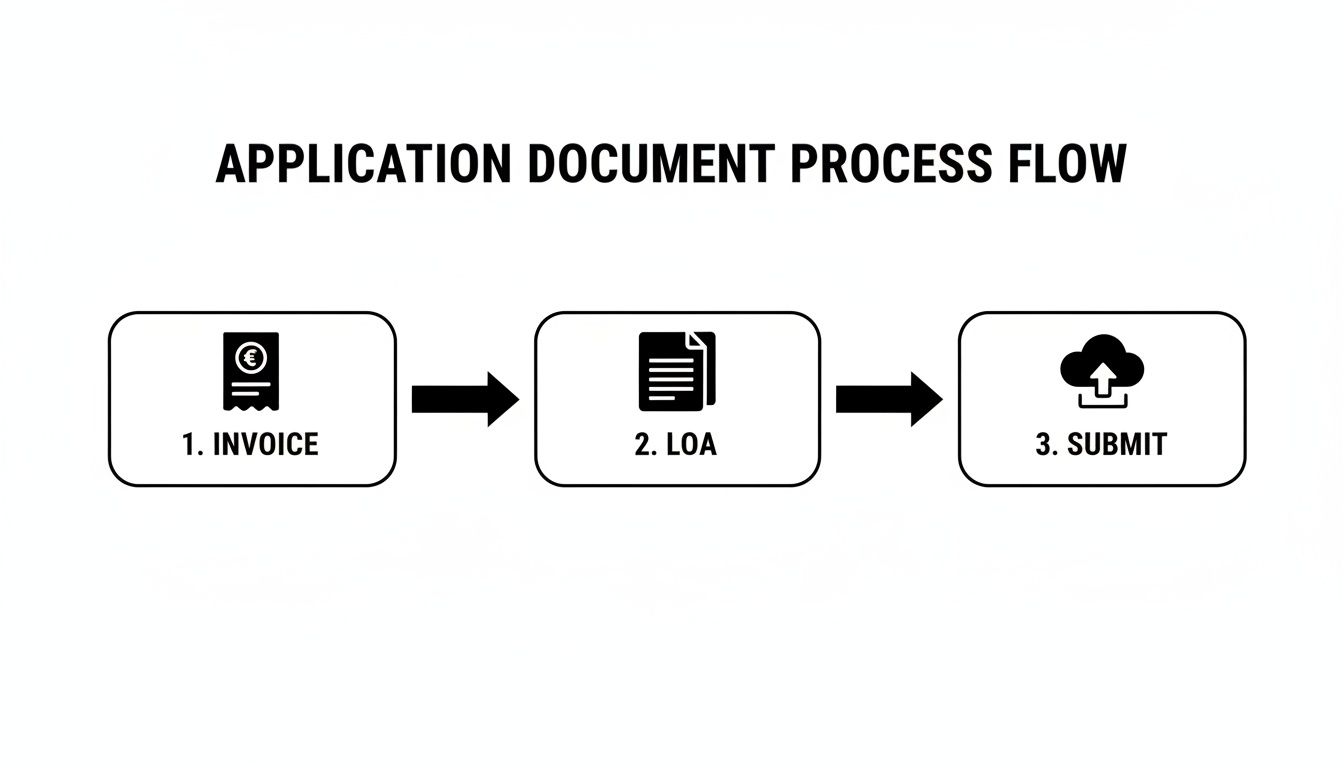
Before you hit submit, do one last check. Make sure every single detail on your invoice or LOA is perfectly clear and matches your account info to a T. Any tiny mismatch can trigger an automatic rejection, and you’ll have to start all over. This is the single most common reason good sellers get denied.
After you submit, it's a waiting game. Sometimes approvals are incredibly fast—I've seen them come through in minutes when an account is spotless and the documents are perfect. Other times, it can take several days or even a few weeks if it needs a manual review. You’ll get a notification in your Seller Central case log either way.
While you're waiting, it’s a great time to think about what comes next. If you're new to Amazon's advertising platform, getting a handle on the basics is smart. You can start by learning what PPC is on Amazon so you’re ready to drive traffic the moment you get that green light.
Getting hit with a rejection notice from Amazon can feel like a punch to the gut, but it’s far more common than you might think. Don't get frustrated. Instead, look at it as a diagnostic report—Amazon is telling you exactly what’s wrong, and your job is to listen carefully and fix it.
Most rejections aren't a final "no." They're just a flag, either automated or from a human reviewer, pointing out that one of your documents didn't meet a specific requirement. If you treat the rejection as part of the process instead of a total failure, you can turn that denial into an approval on your next go.
So, What Went Wrong? Unpacking the Rejection Notice
First things first: dissect that rejection email. Don't just skim it. Amazon’s messages can be a bit generic, but there's almost always a key phrase that pinpoints the exact problem.
Did they say, "we could not verify your supplier" or were the "documents illegible"? These phrases are your roadmap. "Could not verify" is code for "this invoice looks like it came from a retail store or a distributor we don't trust." "Illegible" is a direct shot at your scanning quality—blurry photos, bad lighting, or cropped edges are instant dealbreakers.
Before you even think about reapplying, you have to nail down the precise reason for the denial. Rushing to resubmit the same flawed documents is a surefire way to get rejected again, and multiple failed attempts can make it even harder to get approved down the line.
Your Post-Rejection Audit: A Checklist for Success
Time for a full audit of your failed application. Go through each of these points with a fine-tooth comb to find the weak spot in your submission. A systematic approach is the only way to build a stronger case for your reapplication.
- Document Readability: Were your scans crystal clear? All documents must be high-resolution, laid flat, and show all four corners. A quick photo you snapped with your phone at an angle is an automatic red flag for Amazon's review team.
- Information Matching: Did the business name and address on your invoice match your Seller Central account info exactly? Even a tiny discrepancy, like "LLC" versus "L.L.C.," is enough to trigger a system rejection.
- Supplier Legitimacy: Did your invoice come from a real wholesale distributor? A receipt from a retail store like Costco or a liquidator won't cut it. Amazon’s systems are built to spot these instantly.
- Invoice Date: Was the invoice dated within the last 180 days? Old invoices are worthless in Amazon's eyes because they don't prove you have a current, active supply chain.
- Quantity Requirements: Did the invoice show you bought at least 10 units of the product you're trying to ungate? This is a non-negotiable proof point that you're purchasing at a wholesale level.
A rejection is not a dead end; it’s a detour. The most successful sellers are the ones who treat the first denial as a learning opportunity, meticulously correcting their errors before resubmitting a polished and undeniable application.
The Reapplication Strategy: Getting It Right the Second Time
Once you’ve found the problem and fixed it, your reapplication needs to be flawless. Don't just upload a slightly less blurry version of the same document. If your supplier was the issue, you need to find a new, legitimate one and get a proper invoice from them.
If the problem was a simple information mismatch, go update your Seller Central details so they align perfectly with your official business documents. Do this before you reapply. It shows Amazon you took their feedback seriously and addressed the root cause.
For instance, say your application for a beauty brand was denied because you submitted a receipt from a retail store. Your next move is to open an account with a recognized cosmetics distributor. Then, place a qualifying order, get that legitimate invoice, and use the new, perfect document for your reapplication. It's a strategic approach that demonstrates professionalism and dramatically boosts your chances of finally hearing "approved."
To help you troubleshoot, here’s a breakdown of the most common reasons sellers get rejected and exactly what you need to do to fix them.
Common Ungating Rejection Reasons and How to Fix Them
| Rejection Reason | What It Really Means | Actionable Solution |
|---|---|---|
| "We could not verify your supplier." | Amazon doesn't recognize or trust your supplier. This usually happens with invoices from retail stores, liquidators, or online arbitrage sources. | Source products from a legitimate wholesale distributor. Ensure their name, address, phone number, and website are clearly visible on the invoice. |
| "The documents provided are illegible." | Your scan or photo is blurry, dark, cropped, or hard to read. All four corners of the document must be visible. | Rescan the document using a flatbed scanner at 300 DPI or higher. Ensure there are no shadows, glares, or cropped edges. |
| "Information on the documents does not match." | The name, address, or other details on your invoice don't exactly match the information in your Seller Central account. | Before reapplying, update your Seller Central business information to match your legal documents and invoices character-for-character. |
| "Invoice is not dated within the last 180 days." | Your proof of purchase is too old to be considered a reflection of your current supply chain. | Place a new order with your supplier to get a recent invoice dated within the last 180 days. |
| "The product quantities do not meet requirements." | The invoice doesn't show a purchase of at least 10 units for the ASIN you're trying to ungate. | Your invoice must clearly show a purchase quantity of 10 or more for the specific product. If it doesn't, place a larger order. |
Getting through the rejection process is all about precision and persistence. Once you nail down the issue and provide exactly what Amazon is asking for, you'll be on your way.
Once you secure that approval, the real work begins. To make the most of your new access and start driving sales, your next focus should be visibility. We have a detailed guide on how to optimize your Amazon product listings to attract more customers from day one.
Your Ungating Questions Answered
Even with a clear roadmap, the whole ungating process can feel a bit mysterious. You’ll run into specific situations and find yourself wondering if you’re making the right call. We put this section together to tackle those nagging questions head-on.
Think of it as your go-to FAQ for the trickier parts of getting approved on Amazon. We'll cut through the confusion and give you the answers you need to handle these hurdles with confidence.
Can I Use a Retail Receipt Instead of a Wholesale Invoice?
This is probably the number one mistake I see sellers make, and the answer is a hard no. Amazon’s entire verification process is built to filter out sellers using retail arbitrage for restricted products. A receipt from Walmart or Costco just proves you bought an item; it doesn't prove you have a legitimate, verifiable supply chain.
An invoice from a manufacturer or authorized distributor is a completely different document. It contains the exact information Amazon needs to see:
- Your supplier's official business name, address, and contact info.
- Your business name and address, which has to match your Seller Central account exactly.
- An itemized list of products you bought in wholesale quantities—at least 10 units of each.
Submitting a retail receipt is the fastest way to get your application rejected. It’s a massive red flag that tells Amazon you don’t have a professional sourcing strategy, which is the last thing they want in categories restricted to protect customers.
How Long Does the Ungating Process Usually Take?
Honestly, the timeline for getting ungated can be all over the place. There's no single, predictable timeframe. If your account health is spotless, your sales history is solid, and your paperwork is perfect, you might get an automated approval within minutes.
But if your application gets flagged for a manual review, things slow down considerably. A real person at Amazon will need to look over your documents, and that can take anywhere from a few days to several weeks. Getting into highly restricted categories like Fine Jewelry or Watches almost always triggers a longer, more detailed manual review.
Plan for a multi-week journey, especially for your first few applications or for highly sought-after categories. Patience is key here; rushing the process or bugging seller support won't speed anything up.
If your application gets denied and you have to fix things and reapply, the clock resets. This is exactly why getting your documentation right the first time is so important.
Do I Need to Get Ungated for Every Single Brand?
Great question, because the approval structure isn't always as simple as it seems. Ungating can happen at three different levels: category, sub-category, and brand. The requirements all depend on how Amazon has set up the restrictions.
For example, getting approved for the broader "Topicals" category might automatically unlock your ability to sell products from a bunch of smaller skincare brands. But a major, high-demand brand in that same category—like CeraVe or Neutrogena—will almost certainly require its own separate, brand-specific approval.
A smart move for new sellers is to target broader category ungating first. That opens up a wider range of opportunities right away. As your business grows, you can then strategically apply for those specific, high-velocity brands that require their own Letter of Authorization or dedicated invoices.
Is It Worth Paying for an Amazon Ungating Service?
Tread very, very carefully here. Using a paid ungating service is a risky path and something I generally don’t recommend. While some of these services promise guaranteed approval, they often operate in a gray area that can put your entire seller account in jeopardy. At the end of the day, you are 100% responsible for anything that happens on your account.
Here’s the danger: some of these services might use falsified documents or give you invoices from unverified sources. If Amazon catches on—and their verification systems are getting smarter every day—it can lead to an immediate and permanent suspension.
The safest, most sustainable strategy is to learn the process yourself. Building direct relationships with legitimate suppliers not only gets you the authentic invoices you need for ungating but also establishes a solid foundation for your business long-term. It's an investment in your own business that pays off far beyond just getting approved.
At Next Point Digital, we believe in building sustainable growth strategies, not risky shortcuts. We help brands scale profitably on Amazon by optimizing every part of their presence, from listings to advertising. If you're ready to turn your ungating success into real sales, visit us at https://npoint.digital to see how our data-driven approach can help you dominate your category.