

Amazon listing optimization is all about turning your product pages into high-ranking, sales-generating machines. It’s the art and science of tweaking your title, bullet points, images, and backend keywords to appeal to two very different audiences at once: Amazon's A10 algorithm and real, live shoppers.
Your Blueprint for Winning on Amazon
This guide isn't just another checklist. Think of it as a complete playbook for building Amazon product pages that don't just exist, but actually sell. Too many sellers get stuck focusing on just one piece of the puzzle, like keywords or images, but real success comes from a unified strategy that gets both the algorithm and the customer to say "yes."
We'll start by pulling back the curtain on Amazon's A10 algorithm, focusing on what it actually rewards. From there, we'll dive into how to craft every part of your listing—from the keyword-stuffed copy to the conversion-driving visuals—so that each element works together to attract and persuade.
The Core Optimization Framework
A winning Amazon strategy is a cycle, not a one-and-done task. It breaks down into three core phases that feed into each other, creating momentum that drives sustainable growth. If you ignore one area, you weaken the whole system. But when you get all three working in sync, you create a powerful flywheel that pushes your visibility and sales skyward.
This flowchart lays out the simple, repeatable process for building a listing that wins.
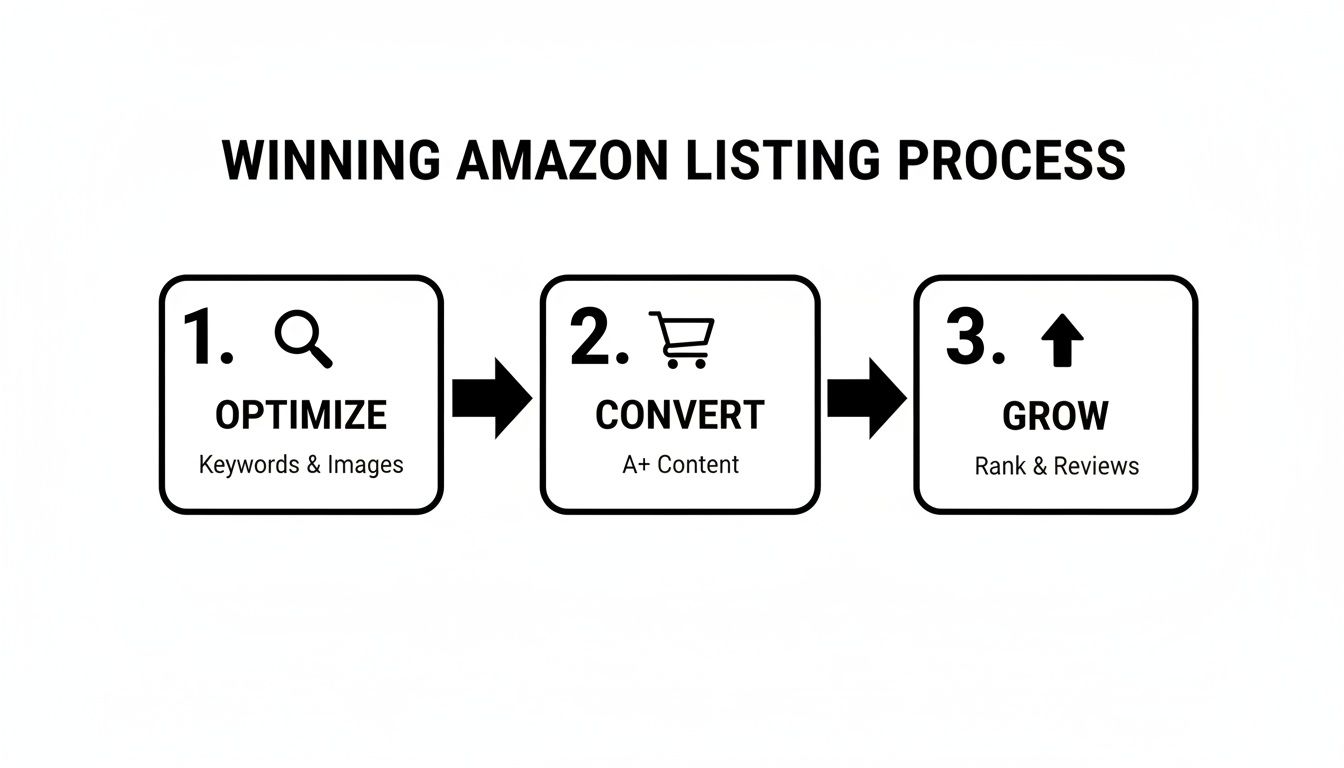
The big takeaway here is that good optimization drives conversions, and strong conversions tell Amazon your product deserves to rank higher—fueling long-term growth.
Before we dive into the nitty-gritty of each optimization step, it's helpful to see how all the pieces fit together. Each component of your listing serves a specific purpose, influencing different metrics that Amazon's algorithm watches closely.
Core Components of a Winning Amazon Listing
| Optimization Component | Primary Goal | Key Metric Impacted |
|---|---|---|
| Keyword Research | Attract relevant traffic | Impressions, Click-Through Rate (CTR) |
| Title & Copywriting | Inform and persuade shoppers | Session-to-Conversion Rate, Unit Session % |
| Product Images & Video | Showcase value, build trust | Conversion Rate, Time on Page |
| A+ / EBC Content | Tell a brand story, reduce returns | Brand Awareness, Conversion Rate, Reviews |
| Backend Search Terms | Capture long-tail keywords | Search Visibility, Organic Rank |
| Pricing & Buy Box | Win the sale | Buy Box Percentage, Sales Velocity |
| Reviews & Ratings | Build social proof | Conversion Rate, Trust |
Understanding this framework shows you that a great title alone won't cut it. You need strong images, compelling A+ Content, and a smart pricing strategy all working together to create a listing that truly performs.
Connecting Optimization to Results
The link between methodical optimization and your bottom line is crystal clear. When you systematically improve each part of your page, you'll see real, tangible results: more traffic from better search rankings, higher conversion rates from persuasive content, and ultimately, more sales. For a deeper look, our guide on how to increase sales on Amazon details even more strategies to boost performance.
The goal isn't just to exist on Amazon; it's to compete and win. A well-optimized listing is your most valuable asset, working for you 24/7 to attract buyers, answer their questions, and close the sale.
Alright, let's get into it. This blueprint will show you exactly how to build listings that don't just take up space—they dominate their categories.
Mastering Keywords and Crafting Clickable Titles
Let's be blunt: the entire customer journey on Amazon starts with the search bar. If your product doesn’t show up when a shopper types in what they need, you’re basically invisible. This is why mastering keywords is the absolute bedrock of any listing optimization amazon strategy. It’s not about guessing or stuffing terms; it’s about learning to speak your customer's language.
Your first move is to build a master keyword list. Forget a quick brainstorm—this is a deep dive into how real people think and search for products like yours. The goal is to get a healthy mix of broad, high-volume terms and those super-specific, high-intent long-tail keywords.
Uncovering High-Intent Keywords
High-intent keywords are the money phrases. They’re what people type when they’re ready to buy, not just browse. You need to think beyond the obvious one-word searches. This is where tools like Helium 10, Jungle Scout, or even Amazon’s own Brand Analytics become non-negotiable.
These platforms let you reverse-engineer your competitors' listings to see exactly which terms are driving their sales. You'll uncover related keywords you would’ve never thought of otherwise. Specifically, hunt for long-tail phrases—queries that are more descriptive, like "noise cancelling headphones for office calls" instead of just "headphones." Sure, the search volume is lower, but the conversion rate is often much higher because that shopper knows exactly what they want.
Here’s a practical way to build your keyword arsenal:
- Start with Your Seed List: Jot down the most obvious terms for your product. If you're selling a yoga mat, this is "yoga mat," "exercise mat," and so on.
- Spy on Competitors: Grab the ASINs of your top three competitors and plug them into your keyword tool. See what they’re ranking for and snag any relevant terms you’re missing.
- Explore Synonyms and Use Cases: How do people describe the problem your product solves? A "memory foam dog bed" could also be a "orthopedic pet bed" or a "supportive cushion for old dogs."
A well-researched keyword list is more than just data; it’s a direct window into the customer's mind. It reveals their pain points, their priorities, and the exact language they use to find a solution—which is exactly what your product provides.
Structuring a Title That Wins the Click
Once you have your keywords, the single most critical piece of real estate on your listing is the title. It has to do two things perfectly: satisfy Amazon's A10 algorithm with your most important keywords and convince a human to stop scrolling and click.
With over 60% of Amazon shoppers now on mobile, you have to front-load your title. All the mission-critical info needs to be in the first 60-80 characters, because anything after that often gets cut off. A poorly structured title buries the lead and loses the click before a shopper even lands on your page.
A winning title formula usually follows a clear, logical pattern.
Title Structure Example
Let's say we're selling a stainless steel water bottle.
- Bad Title: Water Bottle – 32oz – Steel Water Bottle – Great for Sports
- Good Title: Brand Name Insulated Water Bottle, 32 oz Stainless Steel, Leakproof Spout Lid for Sports & Gym, Keeps Drinks Cold for 24 Hrs (Ocean Blue)
The second title is miles better because it balances keywords with benefits. It leads with the brand and primary keyword, then layers in key features (size, material), a core benefit (leakproof), a use case (sports), a quantifiable result (cold for 24 hrs), and a specific detail (color). This is how you start perfecting your listing optimization on Amazon.
Putting It All Together for Maximum Impact
Your title is your first impression and your best shot at getting noticed. It’s a delicate dance between robotic precision for the algorithm and persuasive language for the customer.
- Lead with Your Primary Keyword: Right after your brand name, drop your most important, highest-volume search term.
- Incorporate Key Features: Add essential details like size, quantity, or material. This helps shoppers qualify your product in a split second.
- Highlight a Core Benefit: What's the main advantage? Is it "leakproof," "extra durable," or "fast-charging"? Get that in the title.
- Add a Use Case: Help the customer picture themselves using it. Terms like "for travel," "for office," or "for small dogs" are incredibly effective.
And remember, your title isn't set in stone. Treat it as a living part of your listing that you should test and refine. By combining deep keyword research with a strategic, customer-focused title, you're building the foundation for a listing that gets seen, gets clicked, and ultimately, gets the sale.
Creating Visuals and Copy That Actually Convert
Getting a shopper to click on your title is a crucial first step, but it’s just the opening act. Now, your product detail page has to do the heavy lifting of turning that initial interest into a confident purchase. This is where your visuals and copy have to work together to tell a story, build trust, and ultimately, get the sale.

Too many sellers make the classic mistake of simply listing out features. They’ll write "Made with 100% organic cotton" and just stop there. That’s a huge missed opportunity. A key part of true listing optimization amazon is translating those dry facts into tangible benefits that actually resonate with a customer’s real-life needs and wants.
Writing Bullet Points That Sell
Think of your bullet points as prime real estate. They're often the first thing a shopper scans, even before the main product description. Each one needs to be a mini-sales pitch that either overcomes an objection or highlights a key advantage. The best way to do this is to lead with a benefit-driven, capitalized header, followed by a short explanation.
Instead of just stating facts, you need to answer the silent question on every shopper's mind: "What's in it for me?"
Let's look at a quick example:
- Feature: "10,000 mAh Battery Capacity"
- Benefit-Driven Bullet: ALL-DAY POWER ON THE GO: Never worry about a dead phone again. Our 10,000 mAh power bank charges your smartphone up to three full times, keeping you connected during long flights or busy workdays.
See the difference? This approach immediately frames the feature within a relatable, real-world scenario, making it far more persuasive. You're not just selling a product; you're selling a solution to a problem. This technique is fundamental to improving your page's performance and is a core principle in broader CRO strategies. For more actionable ideas, check out our guide on proven https://npoint.digital/conversion-rate-optimization-tips/.
The golden rule of conversion copywriting is simple: Features tell, but benefits sell. A customer doesn't buy a drill because they want a drill; they buy it because they want a hole in their wall. Always connect your product's features back to the customer's desired outcome.
While crafting compelling copy and visuals is vital, customer reviews also play a massive role in converting shoppers. Understanding how to effectively manage and remove Amazon reviews that violate policies can protect your listing's credibility and conversion rates.
Building a High-Impact Image Stack
While your words are working to persuade, your images are doing the heavy lifting of building trust and desire. Shoppers can't touch or feel your product online, so your photos have to do that job for them. A strong image stack goes far beyond a single, boring product-on-white photo.
Your visual strategy should feel like a complete story, including a mix of these:
- The Hero Image: This is your main image on a pure white background. It has to be high-resolution, crystal clear, and compelling enough to stand out in crowded search results and earn the click.
- Infographics: Use these to visually communicate key features, dimensions, or what makes you better than the competition. An infographic can explain in two seconds what might take a whole paragraph of text to convey.
- Lifestyle Photos: Show your product in action. If you're selling a backpack, show someone hiking with it. These images help customers picture the product in their own lives, which is a powerful psychological trigger for a purchase.
- Comparison Charts: If you have multiple variations of a product, a simple chart comparing the features can be a lifesaver for shoppers, guiding them to the right choice and cutting down on decision fatigue.
Elevating Your Brand with A+ Content
For brand-registered sellers, A+ Content (what used to be called Enhanced Brand Content or EBC) is one of the most powerful tools in your arsenal for Amazon listing optimization. It lets you swap out the standard, plain-text description with a visually rich layout of images, custom text, and brand storytelling modules.
This is your chance to go beyond the bullet points and truly differentiate your brand from the competition.
Use A+ Content to:
- Tell Your Brand Story: Who are you? What do you stand for? Building this connection can turn one-time buyers into loyal customers.
- Showcase Product Details: Use high-quality imagery and callouts to highlight specific design features or materials that make your product special.
- Address Common Questions: Proactively answer the most common customer questions with a visual FAQ section. This not only helps with conversions but can also help reduce returns.
The impact of this feature is well-documented. Amazon's own data suggests that listings with A+ Content can see a 3–10% higher conversion rate and a 5–8% increase in traffic compared to pages without it. That's a measurable lift and a clear ROI for investing the time to create a comprehensive and visually appealing brand experience right on your product page.
Optimizing Your Backend for Hidden SEO Wins
While your title, bullets, and images are the public-facing heroes of your listing, some of the most impactful work happens behind the scenes. The backend of your Seller Central account is a direct line of communication to Amazon's A10 algorithm, giving you a chance to feed it crucial data that customers never see.
Mastering these hidden fields is a quiet but powerful advantage. Think of it like this: if the visible parts of your listing are the walls and roof of your SEO house, the backend is the concrete foundation everything rests on. Without a solid foundation, the whole structure is wobbly. These fields are where you can index for keywords that might feel clunky or just don't fit naturally into your customer-facing copy.
Maximizing Your Backend Search Terms
The "Generic Keywords" field—what most of us call backend search terms—is your primary tool here. Amazon gives you a character limit, currently under 250 bytes, and your goal is to use every last bit of it wisely. This is the place for all the valuable keywords that didn't quite make the final cut for your title or bullet points.
This is your chance to get creative and cover all your bases. Think about including:
- Synonyms and Variations: If your main keyword is "stainless steel water bottle," this is where you drop in terms like "metal canteen," "steel flask," or "gym bottle."
- Common Misspellings: Don't sleep on this one. Customers misspell things all the time, and including those common errors can capture traffic you'd otherwise miss completely.
- Long-Tail Queries: This spot is perfect for specific, conversational phrases. Something like "water bottle that fits in car cup holder" is a goldmine for catching high-intent buyers.
The biggest mistake sellers make is wasting precious backend space. Never repeat keywords that are already in your title, bullets, or A+ Content. The A10 algorithm already sees them; repeating them here provides zero extra benefit and just takes up room that a new, unique keyword could occupy.
Getting Technical with Subject Matter and Other Fields
Beyond that main search term field, your listing has several other attribute fields that act as powerful search filters. It's easy to dismiss fields like "Subject Matter," "Intended Use," and "Target Audience," but they are absolutely vital for discoverability.
For instance, properly filling out "Intended Use" with terms like "Camping," "Hiking," or "Daily Commute" helps Amazon show your product to customers who are filtering their searches for those specific activities. It’s all about helping the algorithm categorize your product with extreme precision. To really nail this, you need to understand how to get Amazon product data directly, which tells you which attributes are most valuable for your specific category.
The Critical Importance of Browse Nodes
One of the most overlooked yet critical backend elements is your Browse Node. This is simply the specific product category you select when you create your listing, and it determines which "digital aisle" Amazon places your product in.
Choosing the wrong one can make you practically invisible.
Imagine selling a high-end kitchen knife but accidentally listing it under "Utility Knives" in the Tools & Home Improvement category. You'd completely miss your target audience of home chefs and culinary enthusiasts. Always use Amazon's Product Classifier tool to find the most specific and relevant browse node available. Drilling down to the most niche category possible ensures you’re competing against the right products and appearing in front of the right buyers.
For a deeper dive into the technical side of visibility, exploring broader ecommerce SEO best practices can provide a more complete picture of how on-site and off-site signals work together.
Aligning Operations to Secure the Buy Box
A perfectly optimized listing is only half the battle. If your backend operations can't deliver on the promises your content makes, you'll never win the most important piece of real estate on Amazon: the Buy Box.
Think of it this way: your listing is the flashy storefront, but your operations—pricing, fulfillment, and customer service—are what keep customers happy and coming back. Winning on Amazon means getting both sides of this equation right.
This operational harmony is what separates the top 1% of sellers from everyone else. Amazon’s A10 algorithm is obsessed with customer experience, and it heavily favors sellers who deliver on competitive pricing, fast shipping, and positive social proof.
Mastering Smart and Competitive Pricing
Winning the Buy Box isn't about having the absolute lowest price. That’s a common misconception. Starting a race to the bottom only kills your margins and tells shoppers your product is cheap.
Amazon’s algorithm is way smarter than that; it’s looking for the best overall value for the customer. That calculation includes your seller rating, shipping speed, and in-stock rate—not just the number on the price tag.
A much better approach is to use an automated repricing tool. These tools act like your own personal pricing analyst, monitoring competitors 24/7 and adjusting your price based on rules you set.
For example, you can create rules like:
- Price $0.01 below the current Buy Box winner.
- Only compete against other FBA sellers.
- Never drop below a specific minimum price (this protects your profit margin).
This kind of intelligent pricing keeps you competitive without giving away the farm.
Think of the Buy Box as Amazon's vote of confidence. It's awarded to the seller most likely to provide an excellent customer experience. Your operational excellence—from pricing to shipping—is how you earn that vote.
The Immense Power of Customer Reviews
On Amazon, positive reviews are the ultimate form of social proof. They’re a massive conversion driver and a huge signal to the algorithm that your product delivers.
While you can't directly ask for positive reviews (that’s a fast track to suspension), you absolutely should have a proactive, TOS-compliant strategy for encouraging authentic feedback.
The easiest and safest way to do this is with Amazon's "Request a Review" button in Seller Central. It sends a standardized, pre-approved email asking for both a product review and seller feedback. It’s manual, but it works. For sellers with more volume, third-party services can automate these requests, saving you a ton of time while systematically building your review count.
And remember, every review is an opportunity. When you get a negative one—and you will—respond promptly and professionally. It shows potential buyers that you stand behind your product and care about customer satisfaction.
Fulfillment Speed and Inventory Health
Your fulfillment method and inventory levels are direct inputs into the Buy Box algorithm. Amazon’s obsession with the customer experience means it heavily favors sellers who ship products quickly and reliably.
This is where Fulfillment by Amazon (FBA) gives you a massive leg up. When you use FBA, your products automatically become Prime-eligible, guaranteeing the fast, free shipping that customers expect and that Amazon rewards. We dig deeper into this in our guide on what Amazon FBA is and how it works.
If you’re fulfilling orders yourself (Fulfillment by Merchant, or FBM), you have to be nearly perfect. You can compete by qualifying for Seller Fulfilled Prime or by maintaining flawless shipping performance metrics.
Just as important is keeping your products in stock. Frequent stockouts are a huge red flag to the algorithm. It signals you're unreliable, which kills your sales velocity and sends your organic rank plummeting. Consistent inventory management isn't just a good idea; it's a non-negotiable part of a healthy, high-performing listing.
A final word of advice: be patient. After you’ve implemented all these changes, don't expect to see results overnight. It often takes 4–12 weeks for the algorithm to re-evaluate your performance, re-score your sales history, and for your organic rank to settle into its new, higher position.
Measuring Your Success and Planning Your Next Move
Getting your new listing live isn't the finish line. It's the starting gun.
Effective Amazon listing optimization is never a "set it and forget it" task. It's a continuous cycle of testing, learning, and refining your approach. Once you've deployed that new title, swapped in fresh images, and polished your copy, your role shifts from creator to analyst. Now it's time to dive into the data to figure out what's working, what isn't, and where your next big opportunity is hiding.
This whole process starts and ends right inside Seller Central, where Amazon gives you all the vital signs for your listing's health. It’s easy to get buried in the sheer number of metrics available. The key is to ignore the noise and focus on just a few key performance indicators (KPIs) to get a clear picture of what’s really happening.
Decoding Your Key Performance Indicators
Tracking the right data tells you the story of your customer's journey. Are people actually finding your product? If so, are they clicking? And, most importantly, are they buying?
These three metrics give you the core answers:
- Sessions: This is simply the number of unique visits to your product page. If you see a jump in sessions after an update, it's a good sign your keyword optimization is paying off and you’re showing up in more relevant search results.
- Unit Session Percentage (Conversion Rate): This metric shows the percentage of sessions that end in a sale. A rising conversion rate is a strong signal that your new images, copy, and A+ Content are doing their job and persuading shoppers to hit "buy."
- Buy Box Percentage: This tells you how often your offer is the one featured when a customer clicks "Add to Cart." A high percentage here is absolutely critical for steady sales and reflects solid operational health.
By zeroing in on these numbers, you can diagnose problems fast. For instance, if your sessions are sky-high but your conversion rate is in the gutter, that points directly to a problem with your on-page content. Maybe your images aren't compelling enough, or your bullet points aren't hitting on the customer's real pain points. You can get a much deeper look into these figures by checking out our complete guide on analyzing Amazon sales data.
Using A/B Testing for Data-Driven Decisions
Guesswork has no place in a marketplace this competitive. If you're a brand-registered seller, Amazon's "Manage Your Experiments" tool is an incredibly powerful feature you should be using. It lets you run A/B tests on the core parts of your listing, like your main image, title, or A+ Content.
You can finally get real answers. For example, you could test a lifestyle hero image against a standard product-on-white shot. The tool will automatically split your traffic between the two versions and declare a winner based on statistically significant data, telling you exactly which image drives more sales.
A/B testing removes ego and assumptions from the optimization process. It replaces "I think this looks better" with "The data proves this converts better." This iterative approach is the secret to long-term, sustainable growth on the platform.
The data consistently shows that the highest-return activities are centered on keyword relevance for getting discovered, visuals for driving the click, and conversion-focused copy for closing the sale. And with over half of all Amazon traffic now coming from mobile, you have to think small-screen first. Optimizing titles with your best keywords in the first 80 characters and creating hero images that communicate value instantly are non-negotiable for mobile success.
This continuous feedback loop of testing, measuring, and refining ensures your listing doesn't just launch well—it evolves to stay ahead of the competition.
Common Questions Answered
When you're deep in the weeds of Amazon listing optimization, a few questions always seem to pop up. Let's clear the air on some of the most common ones sellers ask so you can build your strategy with confidence.
How Often Should I Update My Listing?
Think of your listing as a living document, not a "set it and forget it" task. A major overhaul makes sense when you're launching a new product or if you've noticed sales starting to drop off.
After that initial heavy lifting, checking in on your keywords and what competitors are doing every quarter is a solid routine.
You can definitely make smaller tweaks more often, especially to your backend search terms when your PPC campaigns reveal new, high-converting keywords. But try to avoid making huge, sweeping changes all the time. The A9 algorithm needs a good 4-12 weeks to fully process, re-index, and rank your listing after a big update. Give your hard work time to actually work.
What Is the Role of PPC in Listing Optimization?
PPC and organic optimization are two sides of the same coin—they work best together. Paid ads give you an immediate injection of highly targeted traffic, which helps generate that initial sales velocity the Amazon algorithm loves to see. This can give your organic ranking a serious jumpstart.
Your PPC campaign reports are basically a cheat sheet from Amazon. They show you the exact search terms real shoppers are using to find and buy your product. Feed those proven, high-converting keywords back into your product title, bullets, and backend terms, and watch your organic visibility climb.
What Are the Biggest Mistakes to Avoid?
By far, the biggest mistake I see is "keyword stuffing." Shoving keywords into every nook and cranny makes your copy sound robotic and unreadable, which tanks your conversion rate. If a real human wouldn't talk that way, don't write that way.
Another common blunder is neglecting the backend search term fields or, just as bad, wasting that prime real estate by repeating keywords you've already used in your title or bullet points.
And finally, don't skimp on your visuals. Low-quality images or a complete lack of lifestyle photos—showing your product being used in a real-world setting—is a massive missed opportunity to connect with shoppers and build trust.
Ready to turn your Amazon listings into conversion machines? At Next Point Digital, we blend data-driven strategy with expert execution to get your products seen and sold. Start converting more clicks into customers today.