

If you want to get your product images right on Amazon, you’ve got to play by their rules. That means sticking to their strict guidelines for pixel dimensions, background colors, and file formats. For your main image, specifically, it needs to be at least 1,000 pixels on its longest side, set against a pure white background, and saved as a JPEG, TIFF, or PNG. No exceptions.
Your Quick Reference Guide to Amazon Image Specifications
When you're a busy seller, the last thing you want is a listing suppression because of a simple image mistake. With over 9.7 million sellers on the platform, getting your images compliant isn't just a suggestion—it's essential for visibility and sales. Amazon is notoriously strict about the main image having a pure white background (RGB 255, 255, 255) to keep the marketplace looking clean and professional.
This quick visual guide breaks down the three most important technical rules you need to follow for your main product images.
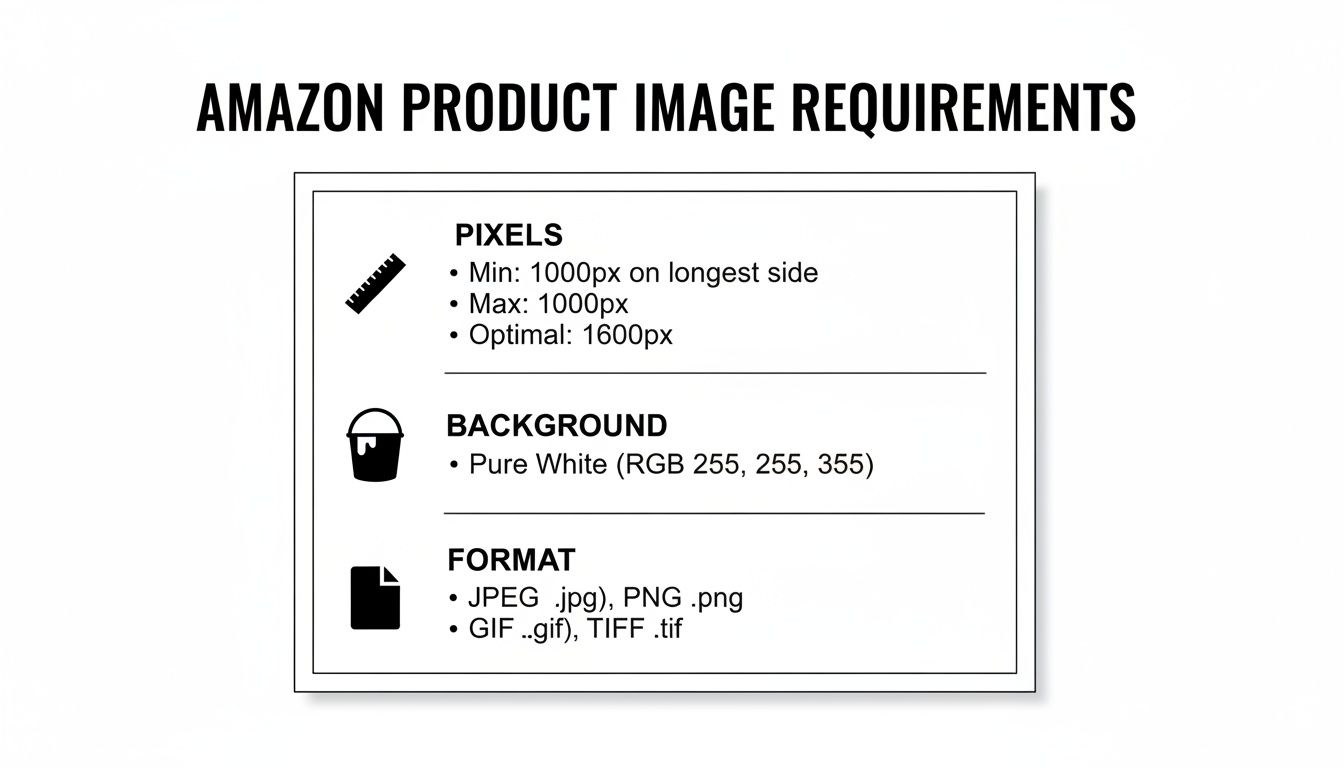
As you can see, nailing the pixel count, background color, and file format covers the fundamentals. Get these right, and you're already ahead of the game.
Comparing Main vs. Secondary Images
While the main image rules are rigid, you get a lot more creative freedom with your secondary images. This is where you can really tell your product’s story, highlight key features, and build trust with lifestyle shots and infographics. Understanding the difference between the two is key to creating a product page that actually converts.
Of course, images are just one piece of the puzzle. For a complete strategy, it's a good idea to brush up on broader ecommerce SEO best practices to make sure your entire listing is optimized to perform.
Amazon Image Requirements At a Glance
To make it even easier, here’s a simple table that puts the requirements for main and secondary images side-by-side. Think of it as a quick checklist to use whenever you're auditing your listings.
| Requirement | Main Image Specification | Secondary Images Specification |
|---|---|---|
| Background | Pure white (RGB 255, 255, 255) is mandatory. | Lifestyle, colored, or graphic backgrounds are allowed. |
| Content | Must show only the product. No text, props, or logos. | Can include text, infographics, lifestyle shots, and charts. |
| Product Fill | Product must occupy at least 85% of the image frame. | No specific fill requirement, allowing for creative compositions. |
Having this breakdown handy ensures you’re not just meeting Amazon's technical rules but also using each image slot to its fullest potential—balancing compliance with conversion.
Understanding Technical Image Requirements
Getting Amazon's technical image requirements right is the foundation of any successful product listing. These rules aren't just arbitrary hoops to jump through; they’re designed to create a consistent, high-quality experience for shoppers across the entire platform. Nailing the correct dimensions, resolution, and file types directly impacts how visible your product is and how well a customer can actually inspect it.
The single most important rule is that your images must be at least 1,000 pixels on their longest side. This isn't a suggestion—it's the bare minimum required to enable Amazon’s all-important zoom feature.
Without zoom, shoppers can't get a good look at your product's texture, materials, or key features. That uncertainty can kill their confidence and, in turn, your conversion rate.
Optimizing Dimensions and Resolution
While 1,000 pixels is the minimum, you should always aim higher. For the best clarity, especially on high-resolution screens like desktops and tablets, you’ll want to upload images that are at least 1,600 pixels on the longest side.
Pushing that up to 3,000 pixels delivers an even sharper, more detailed zoom experience that makes customers feel like they're holding the product in their hands. Amazon's zoom feature, which only activates on images over 1,000 pixels, has been a game-changer for sellers. Amazon has even stated that larger images "have been shown to enhance sales," confirming the direct link between resolution and revenue. On the flip side, listings with subpar images often look pixelated or have jagged edges, which violates clarity rules and can get your listing suppressed.
Key Takeaway: Think of image resolution as a direct investment in customer trust. A clear, zoomable image answers questions before they’re even asked, smoothing out the buying process and showing off the quality of your product.
Choosing the Right File Format
Amazon accepts a few different file formats for product images, but each one has a specific job. Knowing the difference helps you strike the right balance between image quality and how fast your page loads.
- JPEG (.jpg): This is the go-to format and the one Amazon recommends most. JPEGs give you the best of both worlds: high image quality and a small file size, which means your product pages load quickly for customers.
- TIFF (.tif): TIFF files are uncompressed, so they hold onto every last bit of image quality. The downside is their massive file size, which can seriously slow down page loading. They're generally not the best choice for web use.
- PNG (.png): PNGs are your best friend when you need a transparent background. While Amazon allows them, they’re typically reserved for secondary images where transparency is needed, not for your main product shots.
Ultimately, getting the technical specs right is more than just a box-ticking exercise. It's not just about meeting the basic criteria; understanding how Amazon image requirements directly impact ad performance is critical for getting the most out of your ad spend. High-quality, compliant images don't just keep your listings live—they also boost your click-through rates and make your entire campaign more effective.
Mastering Your Main Product Image
Your main product image—often called the "hero" image—is the first thing a customer sees. It’s what shows up in search results and what dominates the top of your product detail page. Because it carries so much weight, Amazon has a strict, non-negotiable set of rules for it to keep the shopping experience clean and uniform for everyone.
Get these rules wrong, and your listing gets suppressed, making it totally invisible to shoppers. The two most critical rules you absolutely can't ignore are the background and how much space your product takes up in the frame.
The Pure White Background Rule
This is the big one. Your main image must have a pure white background. We're not talking about "off-white" or a light grey that looks close enough. Amazon’s system is automated to detect the exact color value.
To be compliant, the background needs an RGB color code of (255, 255, 255). This creates that seamless, floating look that makes products pop. If you're not a photo editing pro, it's worth learning how to achieve a pure white background with software or hiring someone who can.
Expert Tip: Even soft, natural-looking shadows are technically a violation on the main image. While some tiny shadows might slip past Amazon's bots, the best practice is to remove them completely. It’s just not worth the risk of getting your listing suppressed.
The 85 Percent Frame Fill Rule
Amazon also requires the product itself to fill at least 85% of the image area. This isn't an arbitrary number; it's designed to make sure customers can clearly see what you're selling, even from a small thumbnail in the search results.
This means cropping your image tightly around your product, leaving very little empty space. A properly filled frame has a direct impact on your click-through rate, making it a key part of your overall listing health. When you nail the main image, it feeds into a much larger strategy to optimize Amazon product listings.
What Is Strictly Forbidden in a Main Image
To keep the catalog looking professional, Amazon bans a handful of things from the main image. If you include any of these, you’re asking for a policy violation and suppression.
- Text, Logos, or Watermarks: Absolutely no text, brand logos, or any kind of watermark. The image should be about the product, period.
- Props or Accessories: Only show what the customer is actually buying. Don’t include extra items that aren't part of the purchase, as it's misleading.
- Multiple Views: The main image must be a single, clear view of the product. Save the different angles or color options for your other image slots.
- Human Models: Models are generally a no-go, with the major exception being for products in the Clothing, Accessories, or Jewelry categories.
- Illustrations or Graphics: This has to be a real photo of the physical product. No drawings, sketches, or computer-generated graphics are allowed.
Using Secondary Images to Increase Conversions
Your main image is locked down by Amazon's strict rules, but your secondary images are where you can finally start selling. This is your chance to tell a story, go way beyond a simple product shot, and show customers exactly why your item is the one they should buy. These extra image slots are perfect for building trust, answering questions before they're asked, and highlighting what makes your product truly valuable.
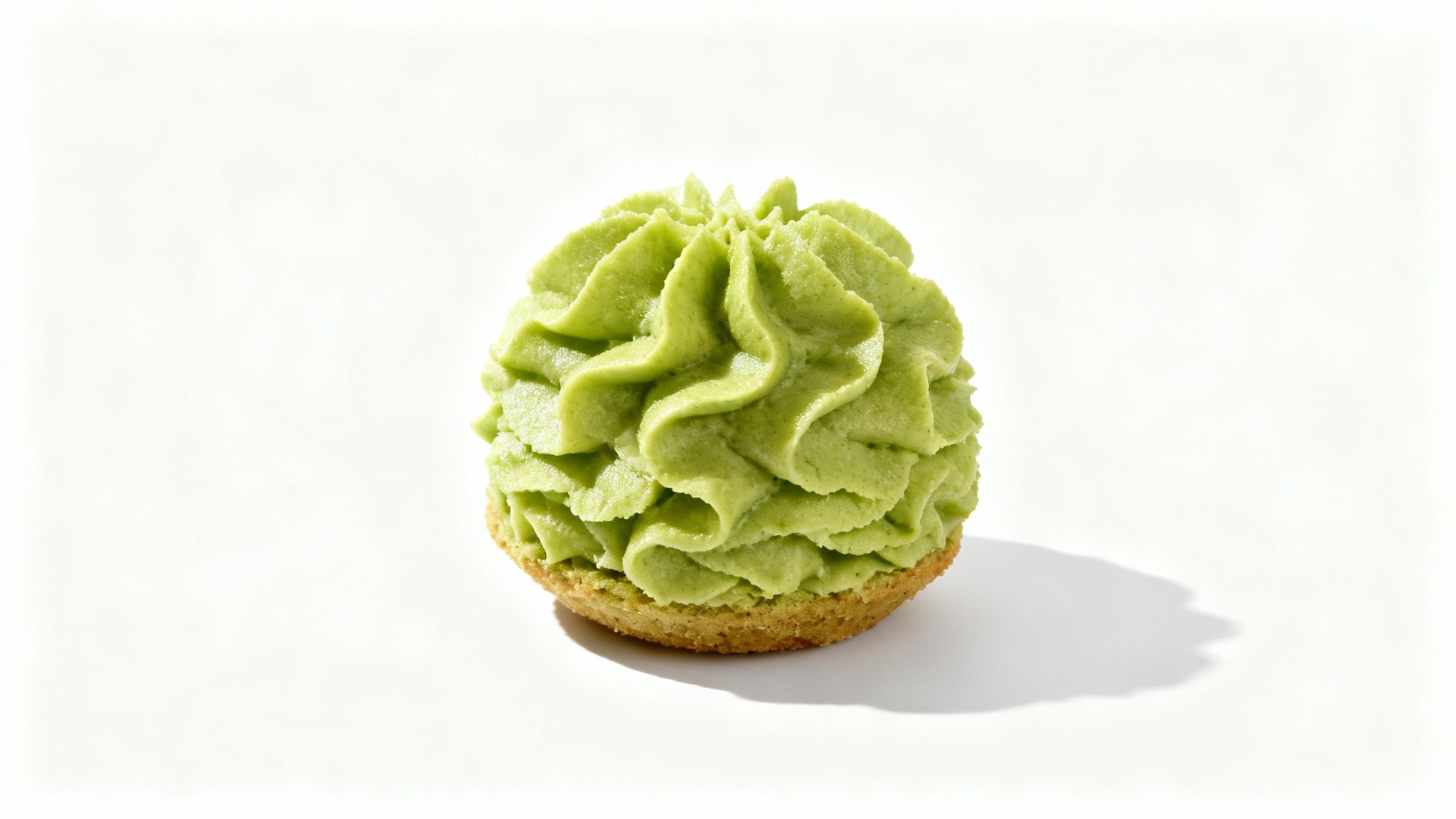
The real goal here is to create a visual narrative that tackles a shopper's doubts head-on and shows off the benefits in a way that just clicks. A well-built image gallery can take a customer from just browsing to hitting "buy now" by giving them all the visual proof they need.
Building a High-Impact Image Gallery
If you're not using every single image slot, you're leaving money on the table. It’s that simple. Amazon’s own data suggests having at least six high-quality images and one video to really drive conversions. The more you add—especially lifestyle shots and infographics that are banned from the main image slot—the more you engage customers. You can find more discussion around these seller best practices on Amazon's forums.
The best approach is to use a strategic mix of different image types to paint a complete picture.
- Lifestyle Photos: Put your product in a real-world setting. This helps shoppers imagine themselves actually using it, making the benefits feel tangible and relatable.
- Feature Callouts: Take a clean product photo and add sharp, concise text overlays that point out specific features. This communicates key selling points instantly, so shoppers don't have to hunt through your bullet points.
- Infographics: Combine icons, text, and images to break down complex information. They're perfect for explaining technical specs, ingredients, or how to use the product.
- Comparison Charts: Selling different versions of an item? A comparison chart is an incredibly effective tool for upselling and cross-selling by making the choices clear.
Key Insight: Your secondary images need to work as a team to answer a customer's unspoken questions. Think about their journey: What does it look like in real life? How does it actually work? What makes this one better than the others? Each image should deliver a clear, visual answer.
Designing Infographics that Convert
Infographics are probably the most powerful tool in your secondary image arsenal. They let you distill your product's most compelling benefits into a format that’s super easy to scan and understand. A great infographic is clean, stays on-brand, and crucially, focuses on benefits, not just features.
For example, don't just state "5,000 mAh Battery"—that's a feature. Instead, show an icon of someone happily using their phone all day with the text "All-Day Power." That's a benefit. This subtle shift connects directly with what the customer actually wants.
When it's all said and done, a strong set of secondary images is a non-negotiable part of your sales strategy. Get them right, and you can seriously boost your page's performance. For more advanced tactics, dive into our guide on how to increase sales on Amazon.
Navigating Category Specific Image Rules
While Amazon’s core technical specifications apply across the board, many product categories have their own unique set of image rules you absolutely need to know. It’s a common mistake to think one size fits all. Failing to follow these specific guidelines can lead to the same listing suppressions as using a non-white background on a standard product.
Think of the general Amazon images requirements as the foundation. From there, you have to dig into the specific style guides for your category. For instance, the rules for Clothing, Jewelry, and Shoes are worlds apart from what you'll find for electronics or home goods. These often dictate exactly how a product can be shown, including whether you can—or must—use a model.

Apparel and Accessories Guidelines
The Clothing and Accessories category is probably the best example of how specialized these rules can get. For main images, Amazon often allows or even encourages using human models to show off fit and style. This is a direct contradiction to the general rule that usually bans models in hero shots.
But even with a model, you still have to follow other core principles. The model has to be standing. You can't have them sitting, kneeling, or in any other pose that might distract from the product itself.
- On-Model vs. Flat Lay: Most clothing needs to be shot on a live model. But for things like socks, accessories, and most kids' apparel, you're required to shoot them flat (known as a flat lay).
- Shoes: This one is famously specific. For the main image, you must show a single shoe, facing left, at a 45-degree angle. The pair can only be shown in your secondary, supplemental images.
- Jewelry: Necklaces should be photographed on a model or laid flat. You can't use a mannequin bust, as Amazon considers that a prop and will reject the image.
Restricted and Unique Categories
It's not just fashion that has its own quirks. For Books, the main image must be the front cover art, and it has to fill 100% of the image frame. That's a huge exception to the standard 85% fill rule.
On top of that, categories like Adult products have extremely strict guidelines that forbid any lewd or obscene content. If you violate those policies, you're looking at much more than a suppressed listing—you could face a full account suspension. Before you even think about your photoshoot, find the specific style guide for your category in Seller Central.
To help you out, I've put together a quick-reference table summarizing some of the most common exceptions to the standard Amazon image requirements.
Common Category Specific Image Rule Exceptions
| Product Category | Main Image Guideline/Exception | Example/Notes |
|---|---|---|
| Clothing | On-model photography is typically required for main images. | Must show the full product; model must be standing. |
| Shoes & Handbags | Must show a single shoe at a 45-degree angle, facing left. | The pair can be shown in secondary images. |
| Jewelry | Fine jewelry often requires specific views (e.g., top-down for rings). | Mannequins are forbidden in main images. |
| Books & Media | The front cover art must fill 100% of the image frame. | The book must be in new condition, with no stickers. |
As you can see, the details matter. Always double-check your category's specific style guide to ensure you're fully compliant and avoid any unnecessary headaches with your listings.
How to Fix Common Image Rejection Errors
Getting an image rejected or, even worse, a full listing suppression is a frustrating experience that hits your sales directly. Amazon's validation system is almost entirely automated, which means even a tiny deviation from the amazon images requirements can get your product flagged.
If you know the most common reasons images get rejected, you can troubleshoot the problem quickly and get your product back in front of shoppers. Most errors boil down to a few usual suspects: the background, something in the image itself, or a technical spec mismatch.
When Amazon suppresses a listing because of an image, you'll usually get a heads-up in Seller Central. Just check the "Performance" tab and look under "Performance Notifications." That’s always the best place to start figuring out what went wrong.
Fixing Non-Compliant Backgrounds
The single most frequent error is a main image with the wrong background. Amazon’s bots are trained to look for one thing and one thing only: pure white (RGB 255, 255, 255). No exceptions.
- The Problem: Your main image has an off-white, light gray, or even a colored background. Sometimes it’s more subtle, like faint shadows, reflections, or a textured surface that the bots flag as non-compliant.
- The Solution: You'll need to jump into a photo editor like Adobe Photoshop or a free alternative to strip out the old background. Create a new layer behind your product and fill it with pure white (that's hex code #FFFFFF). Once you’ve saved the new version, re-upload it to your listing.
Pro Tip: When you’re cutting out the product, use a hard-edged selection tool to get clean, crisp lines. Feathering the edges might look nice, but it can create a soft halo that the system still flags as non-white, landing you right back where you started.
Resolving Prohibited Content on Main Images
Another common tripwire is including extra stuff in your main image. Think of the main image as a sterile, professional studio shot. It should only feature the product being sold, with zero distractions.
- The Problem: Your main image has text, your company logo, a promotional badge like "Made in USA," or a watermark plastered on it. Showing props or accessories that aren't included with the purchase is another surefire way to get rejected.
- The Solution: Edit the image to remove every single one of those forbidden elements. The final version should show only the product, making sure it fills at least 85% of the frame, all set against that pure white background. Save your text overlays, infographics, and lifestyle shots for the secondary image slots—that’s where you have the freedom to add all that conversion-boosting content.
By running through these common errors first, you can fix most image-related suppressions without ever needing to open a case with Seller Support. Always start with the fundamentals—background, content, and resolution—to make sure you’re meeting Amazon's core requirements.
Your Pre-Launch Image Compliance Checklist
Before you even think about hitting “publish” on a new product listing, you need a final, systematic review of your images. I can't tell you how many times I've seen sellers lose out on sales because a single, easily avoidable image error got their product suppressed. One mistake can literally make your product invisible.
This pre-launch checklist is your final quality control step. It’s designed to make sure every visual element meets Amazon’s strict image requirements, turning a complex set of rules into a simple, repeatable process. This way, you can launch with confidence every time. While you can get great insights from your own internal reports, looking at aggregated Amazon sales data can also show you how the top-performing listings are nailing their visual strategy.
Technical Specifications Audit
First things first, let's get the technical stuff out of the way. These are the non-negotiable standards that Amazon’s automated systems check right off the bat. Get any of these wrong, and you won't even make it out of the gate.
- File Format: Make sure every image is saved as a JPEG, TIFF, or PNG. Honestly, just use JPEG. It gives you the best balance of quality and file size for the web.
- Dimensions: Is every image at least 1,000 pixels on its longest side? This is the bare minimum to get that all-important zoom feature. For the best quality, I always recommend aiming for 1,600 pixels or more.
- File Size: Check that each image file is under 10 MB. If it's bigger, it won't upload.
- Color Mode: Your images need to be in sRGB or CMYK color mode. Stick with sRGB—it's the web standard and will make sure your colors look accurate to shoppers.
Main Image Rules Verification
Your main "hero" image is the star of the show, and Amazon puts it under the most scrutiny. A single violation here is a guaranteed suppression. Go through each of these points with a fine-tooth comb before uploading.
- Background Check: Is the background pure white (RGB 255, 255, 255)? Don't eyeball it. Use a color picker tool to be certain, because off-white or light gray will get it rejected.
- Content Purity: Does the image show only the product itself? Get rid of all props, extra accessories, text, logos, and watermarks. Just the product, clean and simple.
- Frame Fill: Does your product take up at least 85% of the image area? Crop in tight. You want the product to be as big and visible as possible.
- Clarity and Focus: Is the image professionally shot, well-lit, and in sharp focus? It has to look clean and professional, with the product being instantly recognizable.
Secondary Image Strategy Review
Finally, take a look at your supplemental images. These are your supporting cast, and they need to work together to answer customer questions, build trust, and ultimately drive conversions.
- Gallery Completeness: Have you used at least six images and one video? This is the sweet spot for maximizing engagement and providing enough information.
- Image Variety: Does your gallery show the product from all sides? You should have a mix of lifestyle shots, infographics, feature callouts, and different product angles. Don't just show the same thing over and over.
- Benefit-Focused Content: Do your infographics and text overlays clearly explain the benefits of the product? It's not just about listing features; it's about telling the customer how those features will make their life better.
Frequently Asked Questions About Amazon Images
It’s completely normal to have questions when you're digging into the specifics of Amazon's image requirements. Let's clear up some of the most common points of confusion sellers run into, so you can get your listings compliant and keep them visible.
Getting these details right from the start is a huge deal—even tiny mistakes can get your listing suppressed. Every image, from your main shot to your secondary photos, has its own job and its own set of rules.
Can I Use Text or Infographics in My Main Amazon Image?
No, you absolutely cannot. Amazon strictly forbids any text, logos, watermarks, or infographics in the main image. This first photo needs to be a clean, professional shot showing only the product against a pure white background (that means RGB 255, 255, 255).
Another hard rule: the product has to fill at least 85% of the image frame. Save all your text overlays and cool informational graphics for your secondary images. In fact, Amazon highly encourages them there to show off features and benefits.
What Happens If My Images Do Not Meet Amazon Requirements?
If your images break the rules, Amazon will likely suppress your product listing from search results. When that happens, your product becomes invisible to shoppers, and your sales grind to a halt until you fix the problem.
You’ll usually get a performance notification in Seller Central explaining what’s wrong. It's on you to correct the non-compliant image and re-upload it to get your listing reinstated and back in front of customers.
Key Takeaway: Image compliance isn't just a "best practice"—it's a core requirement for keeping your listing active and searchable. It's always better to be proactive and double-check your images rather than reacting to a suppression notice.
How Many Images Should I Upload for My Amazon Product?
You only need one main image, but if you want to actually maximize conversions, you should upload a full set. Amazon's own data suggests using at least six high-quality images and one product video to get the best results.
Think of it as telling a complete visual story. You get to show the product from every angle, put it in a real-world lifestyle context, break down key features with a sharp infographic, and give shoppers a clear sense of its size and scale. These images are also fuel for your advertising—strong visuals are a cornerstone of any successful campaign. To learn more, check out our detailed guide on what is PPC on Amazon and see just how much visuals drive performance.
Is a Pure White Background Absolutely Necessary?
Yes, for the main image, a pure white background (RGB 255, 255, 255) is non-negotiable in most categories. An off-white, light gray, or shadowy background will get flagged and rejected by Amazon’s automated system almost immediately.
This rule is all about creating a clean, consistent, and professional shopping experience across the entire platform. For your secondary images, though, you have total creative freedom. Feel free to use different backgrounds, lifestyle shots, and unique environments to tell your product’s story.
At Next Point Digital, we translate complex marketplace rules into straightforward growth strategies. Our experts manage everything from image compliance to sophisticated advertising, ensuring your products don't just meet the requirements—they dominate the search results. Visit us at https://npoint.digital to see how we can clear your path to ecommerce success.