

Let’s be blunt: positive reviews are the single most important driver for success on Amazon. They aren't just social proof; they're the fuel that powers the A10 algorithm, influencing everything from your product's search ranking to your chances of winning the Buy Box. Think of reviews as a critical data signal telling Amazon that your product is legitimate, high-quality, and worth showing to more people.
Why Amazon Reviews Are Your Ultimate Growth Lever

Reviews are the bedrock of trust in the world’s largest marketplace. For the millions of shoppers scrolling through Amazon, customer ratings and written feedback are the closest they can get to a hands-on experience before clicking "buy." This social proof creates a powerful feedback loop that separates top-selling products from those that get buried on page ten.
When a customer sees a product with a high star rating and a healthy number of positive reviews, it instantly builds confidence. They're more likely to click, more likely to add it to their cart, and ultimately, more likely to purchase. This direct impact on your conversion rate is huge, but that's just the beginning.
The Algorithmic Impact of Product Reviews
Amazon's A10 search algorithm is built to show customers the most relevant, high-quality products available. It chews through dozens of factors, and your review profile is one of the heaviest-weighted.
A healthy stream of reviews signals a few key things to Amazon:
- Your product is popular: A consistent flow of new reviews tells the algorithm you have ongoing sales and customer engagement.
- Customers are satisfied: High average star ratings suggest the product is meeting—or even exceeding—buyer expectations.
- Your listing is trustworthy: Verified Purchase reviews confirm that the feedback is coming from legitimate buyers, not bots or bad actors.
These signals directly boost your product’s visibility, helping you rank higher in search results and secure placements in "Frequently bought together" sections. In short, positive reviews tell Amazon to show your product to more people, which leads to more sales and, you guessed it, more reviews. For a deep dive into the right way to approach this, check out this complete guide on how to get reviews on Amazon the right way.
Product reviews remain a powerhouse for sales, with over 80% of customers factoring them into purchase decisions. This directly boosts conversion rates and rankings in the competitive A10 algorithm, which prioritizes trust signals. Learn more about Amazon's market dynamics on goamify.com.
Distinguishing Product Reviews from Seller Feedback
It's absolutely vital to know the difference between product reviews and seller feedback. While both are important, they serve completely different purposes.
Product reviews focus on the item itself—its quality, features, and performance. Seller feedback, on the other hand, is all about your performance as a merchant, covering things like shipping speed, packaging, and your customer service.
This guide will focus exclusively on compliant strategies for generating product reviews. Mastering this process is a non-negotiable part of any serious growth strategy. Once you have a strong review foundation, you'll be ready to scale, and you might be interested in our guide on how to increase sales on Amazon.
Navigating Amazon's Review Policies to Protect Your Account
Before we dive into the tactics for getting more reviews, we need to talk about the rules of the game. Let’s be clear: Amazon doesn’t mess around when it comes to review manipulation. Violating their policies—even by accident—can get your listing shut down or your entire account suspended.
Think of these rules less as a pain and more as the foundation for building a real, sustainable business.
The core principle is simple: you cannot manipulate reviews in any way. This means no funny business with compensation, no pressuring buyers for five-star feedback, and no creating situations that are obviously biased. Amazon wants genuine, unfiltered customer opinions, and they've gotten very good at sniffing out sellers who try to cheat the system.
Confidence comes from knowing exactly where the lines are drawn. A simple mistake, like a poorly worded product insert, can put everything you've built at risk.
Prohibited Actions You Must Avoid
Knowing what not to do is just as important as knowing what you can do. Amazon’s list of no-nos is long, but most violations fall into a few key categories. Get caught doing any of these, and you’ll find yourself in hot water fast.
Here are the absolute "don'ts" when it comes to getting reviews:
- No quid pro quo: This is the big one. You can’t offer a financial reward, discount, free product, or any other perk in exchange for a review. A product insert that says, "Get a $10 gift card for your 5-star review!" is a one-way ticket to suspension.
- No friends and family reviews: Asking your mom, your cousin, or your business partner to leave a review is strictly forbidden. Amazon's algorithm is surprisingly smart at connecting the dots, and those reviews will almost certainly be removed.
- No review swaps: Trading positive reviews with other sellers is a direct violation and an easy way to get both of your accounts flagged.
- No biased language: You cannot ask specifically for a "positive," "5-star," or "happy" review. The request must be completely neutral. You're asking for their honest experience, period.
Key Takeaway: Amazon’s number one priority is protecting the integrity of its review system. Any action that even looks like you're trying to artificially inflate your ratings or mislead customers is a serious violation.
The Problem with Leading Language
Even subtle phrasing can land you in trouble. Amazon pays close attention to the language you use in your follow-up emails, Buyer-Seller messages, and product inserts. The golden rule is to avoid any wording that could be seen as pressuring or guiding the customer toward a positive review.
A classic mistake is using conditional phrasing.
Here's what NOT to do:
"If you loved our product, please leave us a 5-star review! If you had any issues, please contact us first."
This is called review gating. You're actively trying to divert unhappy customers to your inbox while pushing happy customers to leave a public review. It's a clear policy violation because it filters feedback and creates a skewed, overly positive picture of your product.
Why Verified Purchase Reviews Matter Most
When a customer who actually bought your product on Amazon leaves a review, it gets a special "Verified Purchase" badge. That little orange tag is gold. It carries immense weight with both Amazon's algorithm and shoppers browsing your page.
It's simple, really. The badge confirms the reviewer actually purchased the item, making their feedback far more credible than some random opinion.
Reviews without that badge have significantly less impact on your product's ranking and conversion rate. Focusing your efforts on getting feedback from actual, paying customers is the only way to build a sustainable business. You're building a foundation of trust that will pay off for years to come.
Using Amazon's Official Tools to Request Reviews
When it comes to getting reviews, you have to play by Amazon's rules. Navigating their strict policies means focusing your energy on methods that are 100% compliant. Luckily, Amazon gives us official, sanctioned tools to ethically ask for feedback.
Leaning on these built-in systems not only keeps your account safe, but it's also surprisingly effective. Why? Because the requests come directly from Amazon, and that's a source customers already know and trust. These tools should be your first and best line of offense, taking the guesswork out of the process and eliminating the risk of accidentally violating a policy with a poorly worded custom message.
The Power of the "Request a Review" Button
Deep inside Seller Central, on the Order Details page for each sale, sits your most direct and powerful tool: the "Request a Review" button. When you click this, Amazon sends a standardized, pre-written email to the buyer asking for both seller feedback and a product review.
This method is completely foolproof from a compliance standpoint. You can't edit the message, which means you can't accidentally use biased language or offer an incentive. Amazon handles it all, right down to translating the request into the buyer's preferred language.
The sweet spot for using this feature is between 5 and 30 days after the product is delivered. This timing is crucial. Ask too early, and the customer hasn't had a chance to really use the product. Wait too long, and that initial excitement has probably worn off.
If you're ever unsure about what's allowed, this decision tree makes it crystal clear.
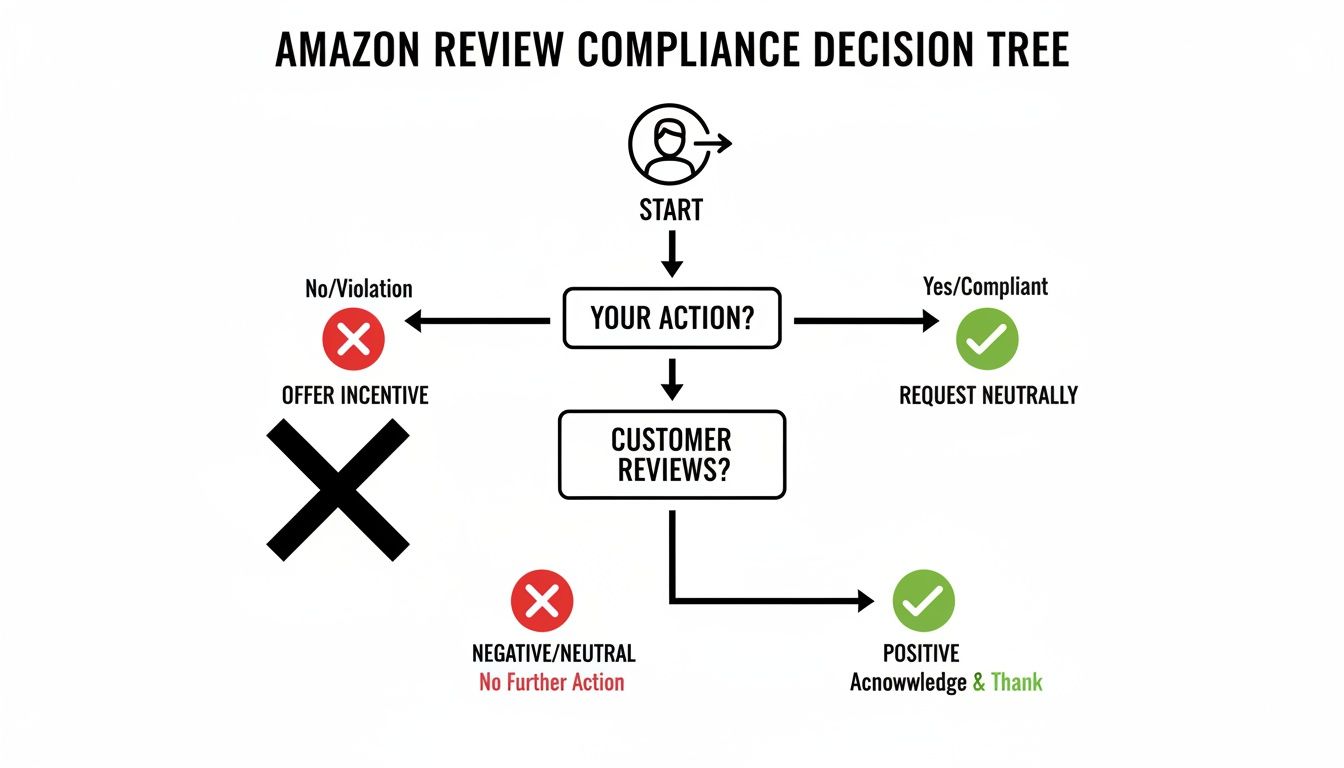
As you can see, any path involving an incentive is a dead end. The only safe and correct route is a neutral, unbiased request.
Automating Your Review Requests
Let's be real—manually clicking the "Request a Review" button for every single order is a soul-crushing task that just doesn't scale. If you're getting hundreds of orders a day, it would become a full-time job.
This is where approved third-party automation tools become a lifesaver. Plenty of great software options integrate with your Seller Central account to automatically trigger that "Request a Review" message for every eligible order, without you lifting a finger.
These tools offer a few huge advantages:
- Massive Time Savings: They completely automate the manual grind, freeing you up to focus on growing your business.
- Perfect Timing: You can set rules to send requests at the ideal moment, like 7 days post-delivery, to maximize your chances of a response.
- Total Consistency: Every single customer gets a request, ensuring no opportunity for feedback ever slips through the cracks.
While these tools do have a subscription fee, the return on investment from a steady stream of new reviews almost always makes it worthwhile. For any serious seller looking to build review velocity, they're practically essential.
To help you decide which approach fits your business best, here’s a quick comparison of the primary Amazon-compliant methods.
Comparing Amazon Review Request Methods
| Method | Best For | Pros | Cons |
|---|---|---|---|
| Request a Review Button | New sellers, low-volume sellers, or those wanting maximum compliance with zero risk. | 100% compliant and free. The request comes directly from Amazon, boosting trust. | Manual and time-consuming; not scalable for high-volume businesses. |
| Third-Party Automation | High-volume sellers or anyone looking to scale their review generation efficiently. | Saves significant time, ensures consistency, and allows for optimized timing of requests. | Requires a monthly subscription fee; relies on a third-party service. |
| Amazon Vine | Brand-registered sellers launching new products or needing to build initial review velocity. | Generates high-quality, credible reviews quickly to build social proof. Vine Voice badge adds trust. | Involves an enrollment fee and giving away up to 30 units of free product. Reviews are not guaranteed to be positive. |
Each method has its place. Manual requests are great when you're starting out, automation is key for scaling, and Vine is a strategic play for launching new products with a bang.
Leveraging the Amazon Vine Program
For brand-registered sellers launching new products, the Amazon Vine program is a game-changer for getting those critical first reviews. Vine invites the most trusted reviewers on Amazon, known as "Vine Voices," to receive new products for free in exchange for their honest and detailed feedback.
The whole idea is simple: Amazon gives its most trusted reviewers free products, and in return, they agree to write an honest review. These aren't just any reviewers; they're selected for writing helpful, unbiased feedback that shoppers find highly credible.
Getting those first few reviews is often the toughest hurdle. A product with zero reviews can really struggle to get off the ground, creating that classic chicken-and-egg problem. Vine breaks that cycle by providing an initial batch of well-written, in-depth reviews that build instant social proof.
How Amazon Vine Works
- Enroll Your Product: You enroll an eligible ASIN in the Vine program through Seller Central and provide up to 30 units of your product at no cost.
- Vine Voices Claim Your Product: Amazon then offers your product to its pool of Vine Voices, who can request it if it catches their eye.
- Reviewers Post Feedback: After receiving and using the product, the Vine Voices post their unbiased reviews, which get a special "Vine Voice" badge for extra credibility.
One thing to get straight: Vine does not guarantee positive reviews. Vine Voices are known for their honest, and sometimes critical, feedback. If your product has flaws, they will absolutely point them out. This makes the program a fantastic way to get genuine insights while also building that crucial initial review count.
The costs for Vine have changed over the years, but there's typically an enrollment fee per parent ASIN. For sellers who are confident in their product's quality, it's a strategic investment to kickstart a product's lifecycle and give it the momentum it needs to take off.
Crafting Compliant Product Inserts That Encourage Feedback
Your product’s packaging is your most direct line of communication with a customer, catching them right at that peak moment of excitement—the unboxing. A well-designed product insert is one of the most effective, low-cost tools you have for encouraging feedback. It’s your chance to make a personal connection that goes far beyond the digital transaction.
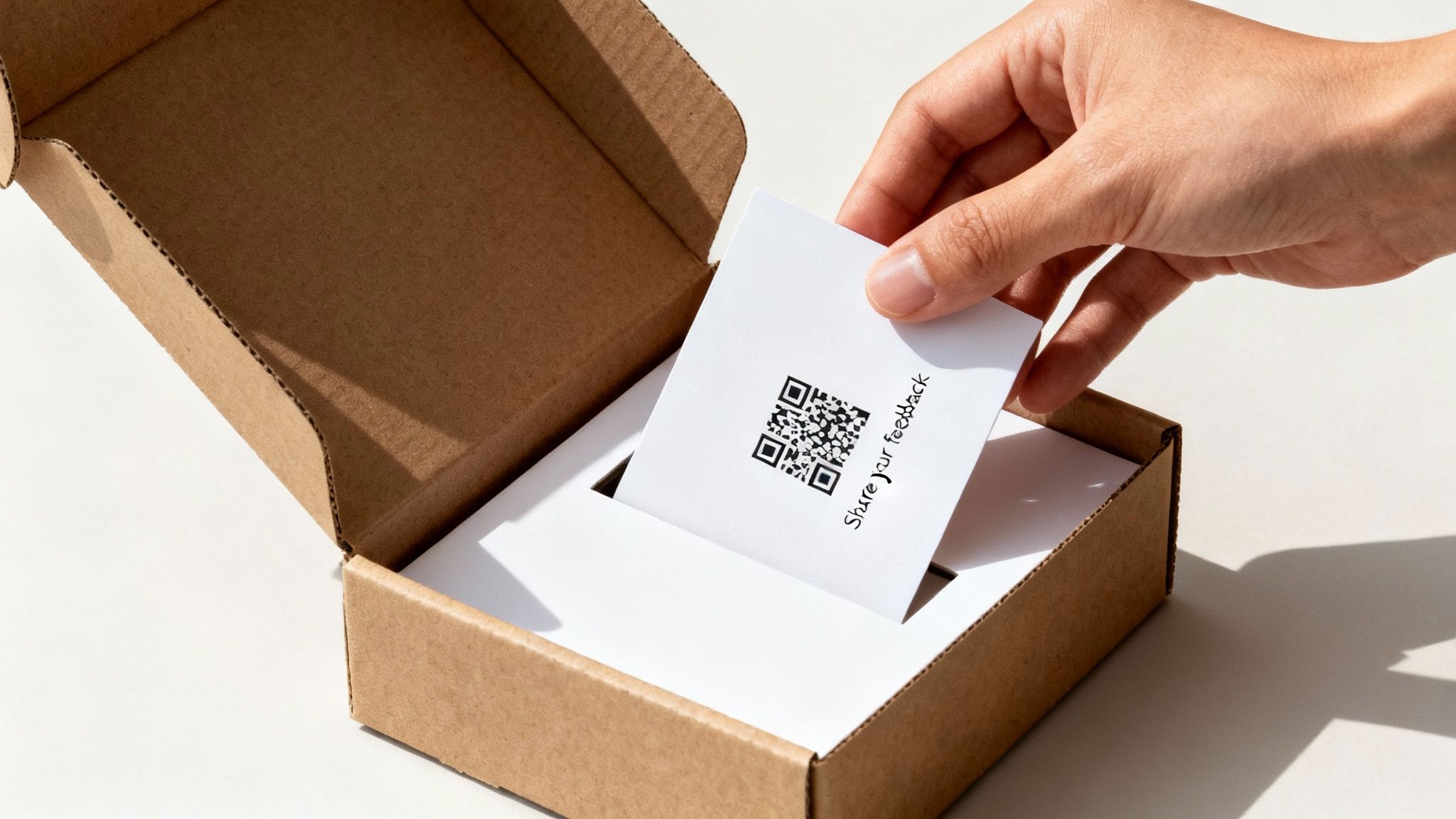
However, this is also where a lot of sellers get into serious trouble. A poorly worded insert can easily lead to an account suspension. The key is to craft your message in a way that is completely neutral and compliant with Amazon's strict policies. Forget begging for five stars; your focus should be on customer satisfaction and gently guiding happy buyers to share their experience.
Staying Within Amazon's Guidelines
The rules for inserts are the same as for any other communication: you absolutely cannot ask for a positive review or offer any incentive in exchange for feedback. Your messaging has to be entirely unbiased and avoid any "if/then" language that tries to steer unhappy customers away from leaving a review.
Key Takeaway: The goal of a product insert is to enhance the customer experience and neutrally ask for an honest review. Never attempt to filter out negative feedback or bribe customers for positive ratings.
For example, a message like, "If you love our product, leave a review! If not, contact us!" is a clear violation known as review gating. Instead, your message should focus on gratitude and a simple, neutral request for the customer's opinion.
Designing an Effective and Compliant Insert
A great insert does more than just ask for a review—it adds value. It should be professionally designed, reflect your brand's personality, and make the customer feel appreciated. Think of it as the final touchpoint in their unboxing experience. To learn more about creating a cohesive brand feel, check out our guide on how to optimize Amazon product listings to align with your messaging.
Here are a few elements of a winning product insert:
- Thank the Customer: Start with a genuine "thank you." A simple "Thank you for your purchase!" goes a long way in building goodwill.
- Offer Value: Provide a helpful tip for using the product, share your brand story, or offer a link to an online user guide. This shows you care about their experience beyond the sale.
- Neutral Review Request: Use neutral language like, "Share your experience with other shoppers" or "We'd love to hear your feedback."
Using QR Codes for a Seamless Experience
To make leaving a review as easy as possible, include a QR code on your insert. Friction is the enemy of action. The more steps a customer has to take, the less likely they are to follow through. A QR code zaps the friction of having to search for the product page.
You can create a QR code that links directly to the product’s review page on Amazon. This simple addition can seriously increase your review conversion rate. When a customer scans the code, they're taken straight to the place where they can share their thoughts, making the process quick and painless.
Compliant QR Code Wording Examples:
- "Scan to share your thoughts."
- "Leave a review."
- "How did we do? Let us know."
Notice the language is direct, simple, and completely neutral.
The Power of the Unboxing Experience
Don't underestimate the psychological impact of a great unboxing. When a product arrives in thoughtful, high-quality, and frustration-free packaging, it immediately elevates the customer's perception of your brand. This "wow" moment can be a powerful motivator for leaving a positive review on its own.
Your product insert is the cherry on top. A flimsy piece of paper with a desperate plea for reviews feels cheap. A professionally printed card with a thoughtful message feels premium.
By focusing on delivering an exceptional end-to-end experience—from the packaging to the product itself—you create customers who want to share their positive story. The insert simply serves as a gentle and helpful reminder to do so. This approach isn't just about getting reviews; it's about building a brand that customers love and want to talk about.
Understanding Seller Feedback Versus Product Reviews
On the surface, any five-star rating feels like a win. But in the world of Amazon, it’s critical to understand where that feedback lives. Many sellers mistakenly treat seller feedback and product reviews as the same thing, but they influence your business in completely different ways.
Confusing the two can lead you to misinterpret your performance and miss out on key growth opportunities.
Let's break it down. The distinction is really about who versus what. Seller feedback is all about you, the seller. Product reviews? They're all about the item you sold.
What Is Seller Feedback?
Think of seller feedback as a report card on your performance as a merchant. It answers one simple question: "How was the buying experience?" This rating is all about your operations, not the product itself.
A customer leaving seller feedback is judging you on things like:
- Shipping Speed: Did the order arrive on time, or even better, a day early?
- Packaging Quality: Was the item packed securely to keep it safe on its journey?
- Customer Service: If they had a question, were you quick, professional, and helpful?
- Item as Described: Did the product they received actually match your listing's description?
This feedback feeds directly into your Account Health metrics inside Seller Central. A high seller feedback rating is a massive factor in winning the coveted Buy Box, as it tells Amazon you’re a reliable and trustworthy merchant who gets the job done right.
What Are Product Reviews?
In contrast, product reviews are focused entirely on the item. This is the feedback that shows up right on your product detail page, complete with star ratings and those all-important written comments. This feedback answers the question: "How good is this product?"
These are the reviews that provide social proof and heavily influence a shopper’s decision to buy. While this guide is focused on getting product reviews, you can’t ignore the role of seller feedback. A fantastic customer experience is the foundation for both.
A happy customer who gets their order quickly, finds it well-packaged, and feels valued is far more likely to be in the right frame of mind to leave a glowing product review when you ask.
How the Two Systems Work Together
It's simple: great service creates happy customers. Someone who has a smooth, hassle-free buying experience is naturally going to feel better about the product they received. That positive feeling makes them way more open to leaving a product review when you send a request.
So, by nailing the service side of the equation (and earning great seller feedback), you’re creating the perfect conditions for generating more positive product reviews.
Amazon is always tweaking its feedback systems. A significant recent update allows customers to leave star-only seller feedback without any comments, which simplifies the process. This change often helps capture feedback from those satisfied-but-silent customers, which can give your overall seller rating a nice boost. You can read more about this 2025 star-only rating update on goaura.com and see how it might affect your account health.
Ultimately, both types of feedback build your reputation on the platform. A strong seller rating helps you win the Buy Box, and a high product rating convinces shoppers to click "Add to Cart." To really succeed long-term, you have to master both. To see just how much ratings can impact sales, you can dig into the data behind Amazon sales on npoint.digital for more insights.
How to Analyze and Improve Your Review Performance

Getting reviews on Amazon isn’t a "set it and forget it" task. It's a constant loop of monitoring what’s working, figuring out what isn't, and refining your approach. Before you can improve, you need a clear picture of where you stand. That starts with tracking a few key numbers that tell the real story.
The most important metric to watch is your review rate—the percentage of orders that actually turn into a review. To find it, just divide your total reviews by your total orders over a set time (like 30 days) and multiply by 100. A typical rate is somewhere between 1-2%. If you're hitting that range, you’re doing something right.
Another number to keep an eye on is your review velocity, which is just the speed at which you’re getting new reviews. A consistent trickle of fresh feedback is a huge signal to Amazon’s A9 algorithm that your product is relevant and active.
Identifying and Fixing Performance Gaps
So, what happens if your review rate is stuck below 1%, or your velocity has completely stalled out? Don't panic. This is a super common problem, and it’s usually fixable. You just need to play detective and check the most likely culprits.
Start with these questions:
- Is Your Timing Off? Sending a review request too early is annoying, and sending it too late means the customer has already moved on. Hitting them up 7-10 days after delivery usually hits the sweet spot. They've had time to use the product, but the experience is still fresh.
- Are Your Inserts Working? Take a hard look at your product insert. Is it clear? Is it compliant? A clunky design or a broken QR code will absolutely tank your conversion rate. Make it effortless for the customer.
- How’s the Customer Experience? Dive into your seller feedback and returns data. If you see high return rates or a string of negative seller feedback, it often points to a bigger problem that’s stopping people from leaving a good product review.
On Amazon, seller feedback and product reviews are two sides of the same coin, and both are critical for your account's health and visibility. You need to maintain 4+ stars across both, since things like your Buy Box win rate depend on them. One can't make up for the other.
Turning Negative Reviews into a Strategic Advantage
Look, nobody enjoys getting a one-star review. But instead of getting defensive, you should treat that feedback like free market research. Buried in those complaints is some of the most valuable data you'll ever get.
For any real, continuous growth on Amazon, mastering the art of analyzing customer feedback is non-negotiable.
Are several people complaining about the same weak point on your product? Is the instruction manual confusing? That’s not a crisis—it’s a product development roadmap someone just handed you. Use those insights to improve your next manufacturing run, tweak your listing to be clearer, or upgrade your packaging.
When you address the root cause of complaints, you don’t just prevent future bad reviews. You build a better product and a stronger brand. This proactive mindset is a core part of any smart data-driven marketing strategies.
Common Questions About Getting Amazon Reviews
When you're trying to get more reviews on Amazon, it's easy to get lost in the weeds. A few key questions pop up again and again for sellers, and getting clear, no-nonsense answers is the best way to build a review strategy that actually works and keeps your account safe.
Let's break down some of the most common things sellers ask.
How Many Reviews Do I Need?
Honestly, there’s no magic number here. Instead of chasing some random figure, your first mission should be to lock in at least 10-15 solid reviews. This builds an essential baseline of trust and social proof, especially if you're up against competitors who already have hundreds.
Once you hit that mark, the game changes. It's less about stockpiling a massive number of old reviews and more about keeping a fresh, steady stream coming in. What Amazon's algorithm really cares about is consistency and a high recent rating—ideally, you want to stay above 4.0 stars.
Can I Email Customers Directly?
No. And I can't stress this enough: absolutely not.
Reaching out to a customer about their Amazon order through any channel outside of Amazon's own Buyer-Seller Messaging system is a fast track to getting your account suspended. That means no personal emails, no phone numbers, and no social media DMs.
All your communication, especially when asking for a review, has to stay within Amazon's approved channels. This is a non-negotiable rule designed to protect buyer privacy—and your seller account.
What Should I Do About a Negative Review?
First off, don't panic. A bad review feels personal, but it’s just part of the business. Take a breath and look at it objectively. Does it violate Amazon’s community guidelines? If it includes profanity, personal information, or is entirely about a shipping issue on an FBA order, you can report it and might get it removed.
If the review is legitimate feedback, treat it like free market research. You’re allowed to post one professional public reply. Use it to offer help or simply thank them for the input. This shows other potential buyers that you’re a stand-up seller who listens.
Never, ever argue with the customer or offer them a refund or free product to change their review. That’s a serious policy violation. If you're looking to better understand how Amazon handles logistics and customer service, you might find it helpful to read our guide explaining what Amazon FBA means and how it all works.